Feature
Page builder
yesterday
Events listing: members see the sessions they booked with you
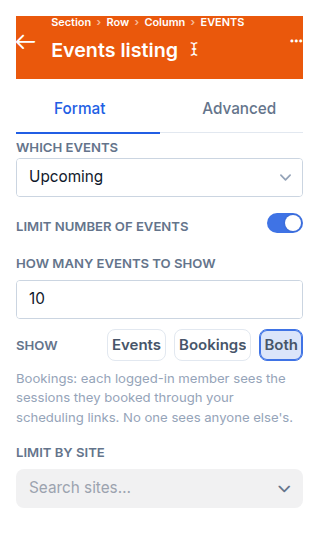
The Events listing element on your pages can now show each member their own upcoming 1:1 sessions, the ones they booked through your scheduling links, right alongside your events. Each one is marked Your session with and the host's name.
Only the member who booked a session sees it. Visitors who are not logged in and other members never do.
The element's new Show setting picks what it lists: Events, Bookings (only the member's own sessions) or Both. Every Events listing you add from now on starts on Both. For one you already have, open the page from Landing pages (or your site's pages) in the builder, select the Events listing, and pick Both or Bookings under Show.