

The Simplero Changelog: Here's what we've been up to...
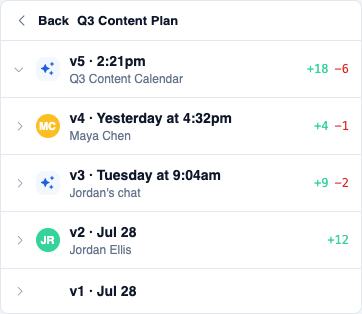
Version history on your AI Coach sources now shows who made each change: your avatar for edits you made directly, or an AI badge with a link to the chat that made the edit when the AI updated it for you. Each version also shows a friendly relative time (like "Yesterday at 4:32pm") instead of a raw timestamp, So it's easier to scan what changed and when.
Open any source in Simplero.Coach, click the ⋯ menu on it, and choose History to see it.
In the new page builder experience, clicking into a Headline, paragraph, or other text block could leave its formatting toolbar partly covered by the Row/Column/Element label above it — sometimes hiding buttons like Insert video. The toolbar now always stays on top and fully clickable.
Try it in Landing pages: open a page, turn on New page builder experience from the editor's ⋯ menu if you haven't already, then click into any text to edit it.
When Coach builds a landing page with an opt-in form, the email input now binds to your account's built-in Contact email field — the same field the page builder UI always uses. Coach will no longer invent a separate custom email field, so signups land on the real contact record and list subscriptions work as expected.
Try it: open Coach and ask for a landing page with an email opt-in form, then check the form fields in the page builder.
If a participant needed to sign a contract for an event — especially someone you registered manually rather than through self sign-up — signing could fail with a broken page instead of completing, if they reached the event from your membership site's custom domain. That's fixed: signing now works no matter which domain someone reaches the event from, and tak…
Opening a comment notification or a copied comment link on a busy forum post sometimes left you at the top of the post instead of the comment you meant.
Those links now load enough comments to find the one in the URL and scroll you straight to it — even when the thread has dozens of replies.
No settings to change: open any comment notification or “copy link” URL on a long thread to try it.
When an email to a contact was Dropped (often because the address was on an email suppression list), the contact could sit stuck with no way to clear it — Retry only showed for bounces, and even then it did not fully clear suppression.
Now:
- Dropped-from-suppression contacts show the same Retry control as bounced ones
- On the delivery report for a Dropped e…
Adding or editing a "Product category" link in your site's navigation menu could fail to save with an error, even though every other link type worked fine. That's fixed — Product category links now save and work like any other menu link.
Open Sites, open your site's editor, then click a navigation link (or add a new one) and choose Product category.
On an affiliate program's Payout tab, clicking Mark paid next to a single affiliate showed an error instead of registering the payout — you had to select the affiliate's checkbox and use Select action → Mark paid instead. The per-row button now works the same as the bulk action, marking that affiliate's owed commission as paid immediately.
Open Affiliate programs, pick a program, then Affiliates → Payout to try it.
If you set up default automations for scheduling links (things like a booking reminder email or text), they were being silently skipped whenever you created a new scheduling link — you'd have to notice they were missing and add them by hand from the link's Automations tab.
New scheduling links now automatically start with whatever default automations you've…
Admin pages that used to cram two columns side by side on a phone — like the event editor and other settings forms, plus your contact, purchase, and membership pages — now stack neatly from top to bottom, so labels and fields are easy to read and tap instead of squished. It's another step in making Simplero comfortable to run from your phone, and nothing changes on a computer.
Take a look at your phone: Contacts.
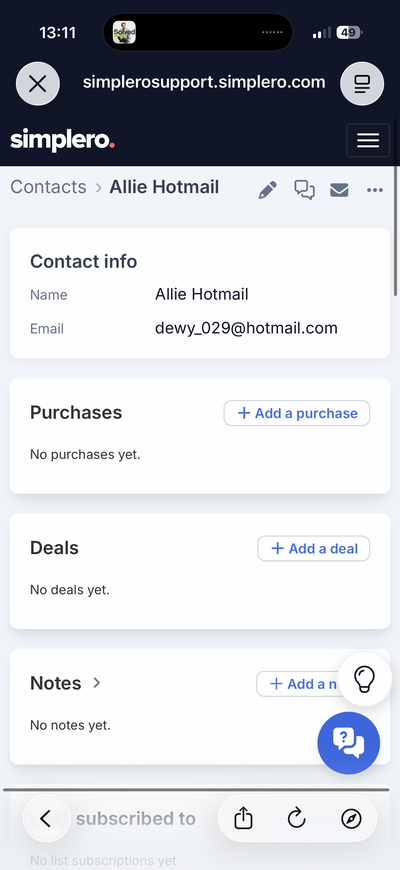
The Help tab used to hold both your bot and your help articles. They're now two separate tabs: Chat and Guides.
Chat also keeps every conversation a visitor has started with your bot, instead of just the one. They can look back through them and pick any of them up again.
Your bot now answers there as itself. The instructions, tone, default model and web access…
Members could already choose how they hear about new ideas and comments on your Ideas Board, but that setting wasn't listed on the notifications page — only Forum, Blog, and a few others were.

Open a forum post with more than one attachment and click a vertical (portrait) video, and the full-screen viewer now scales it to fit your screen with the controls always visible. Before, the video could run off the bottom of the screen, so you had to zoom out just to reach play, pause, or volume.
No admin deep link — this is a member-facing forum viewing fix with no dedicated settings screen. No screenshot — showing it meaningfully needs a real playable portrait video, and this environment has no way to capture one.
When something you filled in wasn’t valid — a missing URL, a keyword that’s already taken, a timeout that has to be a positive number — a side panel could just sit there when you clicked Save, with no hint of what was wrong. Bot channels never showed a reason at all.
Side panels now put the problem right at the top of the form and scroll it into view on longer forms, every time you try — not just the first time.
You’ll see it anywhere you edit in a side panel — for example a channel on one of your Bots, or an entry under Short links.
Images and videos you embed in a choice menu option's custom message are now tracked as used, so they won't show up in the Unused tab on Files & Assets.
If a product is set to Show prices including tax, customers already see tax-inclusive prices on the order form — but after buying, their purchase page listed each installment without tax. That mismatch was confusing.
Installment amounts on the purchase page now match what they saw at checkout (tax included), with a clear “Includes …” line for the tax portio…
If someone started booking a paid scheduling link but never finished checking out, the abandoned hold was cleared after about 15 minutes — but it was treated exactly like a real cancellation. If you had an automation that runs when a booking is canceled (like refunding credits), it would run for a session that was never actually booked or paid for.
Abandoned …
Just opening a page with a Headline, Subheadline, or Preheadline element could bump your unpublished changes count and add a new entry to version history — even if you didn't touch anything. That's fixed: opening a page now only shows unpublished changes when you actually made one.
Open any page from Landing pages to try it.
You can now manage a site’s branding graphics through the API — the same way products and courses already accept images.
On GET and PATCH /api/v2/sites/{id}, these fields are available:
card_image_idlogo_id(light logo)dark_mode_logo_id(dark logo)favicon_id
Upload images with POST /api/v2/assets, then PATCH the site with the asset IDs. Handy for reb…
Undoing the first section on a page and then redoing it put the section back in the node tree, but the canvas stayed empty — Redo looked like it hadn't done anything, and the section only reappeared after a reload.
Redo now puts the section back on the canvas where it belongs, so what you see on the page matches the node tree and the version history.
Try i…
